|
Guidelines
1) If you are prompted with the dialog below, click the 'Install' button to install Extended File Handler.
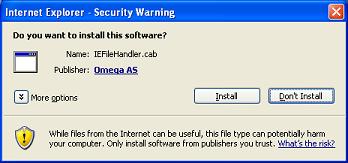
2) If are not prompted with the dialog above, check for a yellow bar at top of this browser that is blocking the install. Click on yellow bar and choose 'Install Activex Control' to begin installation.
3) If still nothing happens, download and install manually.
|
Features
- Enhanced file upload
- Drag & Drop file(s) from Windows Explorer
- Automatic upload of modified files
- Download multiple files with single click
Important!
- If the installation is successfull, it will close this window and refresh the parent
window.
- If you are asked to restart your system, please confirm.
- If you are installing manually, you should close this window after installation.
|